Core Concepts
This page explains the fundamental concepts in EMET. Understanding these will help you navigate the dashboard, configure rules, and interpret the data EMET collects from the AI agents it monitors.
Events
An event is a single captured action taken by an AI agent and recorded by EMET. Events cover the full lifecycle of an AI agent session — session start and end, tool invocations, tool failures, user prompts, agent notifications, sub-agent activity, permission requests, and context compaction.
The full event-type catalog and JSON payload reference is available in the EMET customer documentation.
Event Data
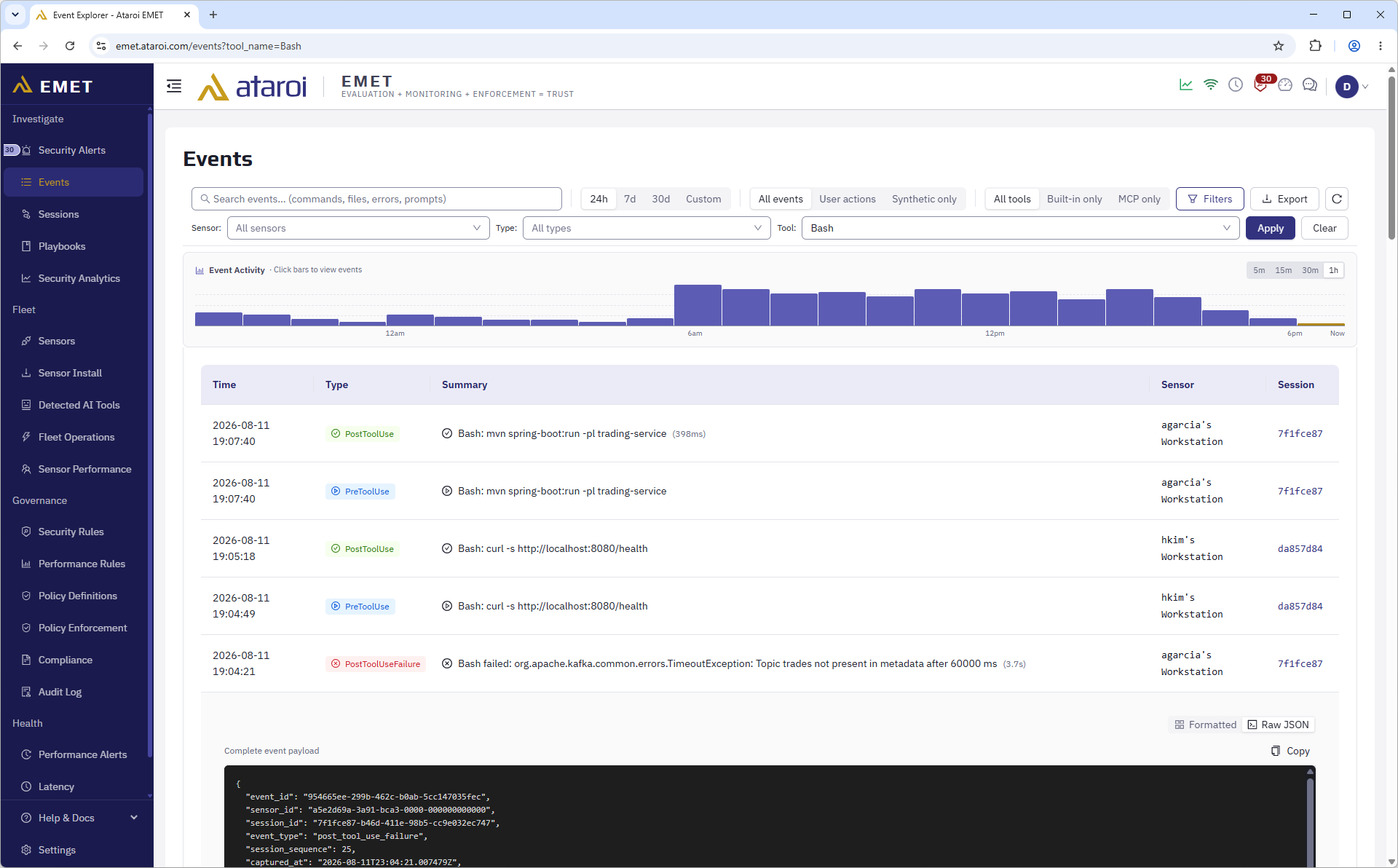
Each event carries rich metadata — precise timestamps, session and sensor context, and the full captured payload. Events are designed to be immutable once stored — neither the dashboard nor the API exposes any way to edit a stored event.
Event Signing
Every event is cryptographically signed at the sensor and verified on receipt, providing tamper-evident audit trails as part of a defense-in-depth integrity design.
Sessions
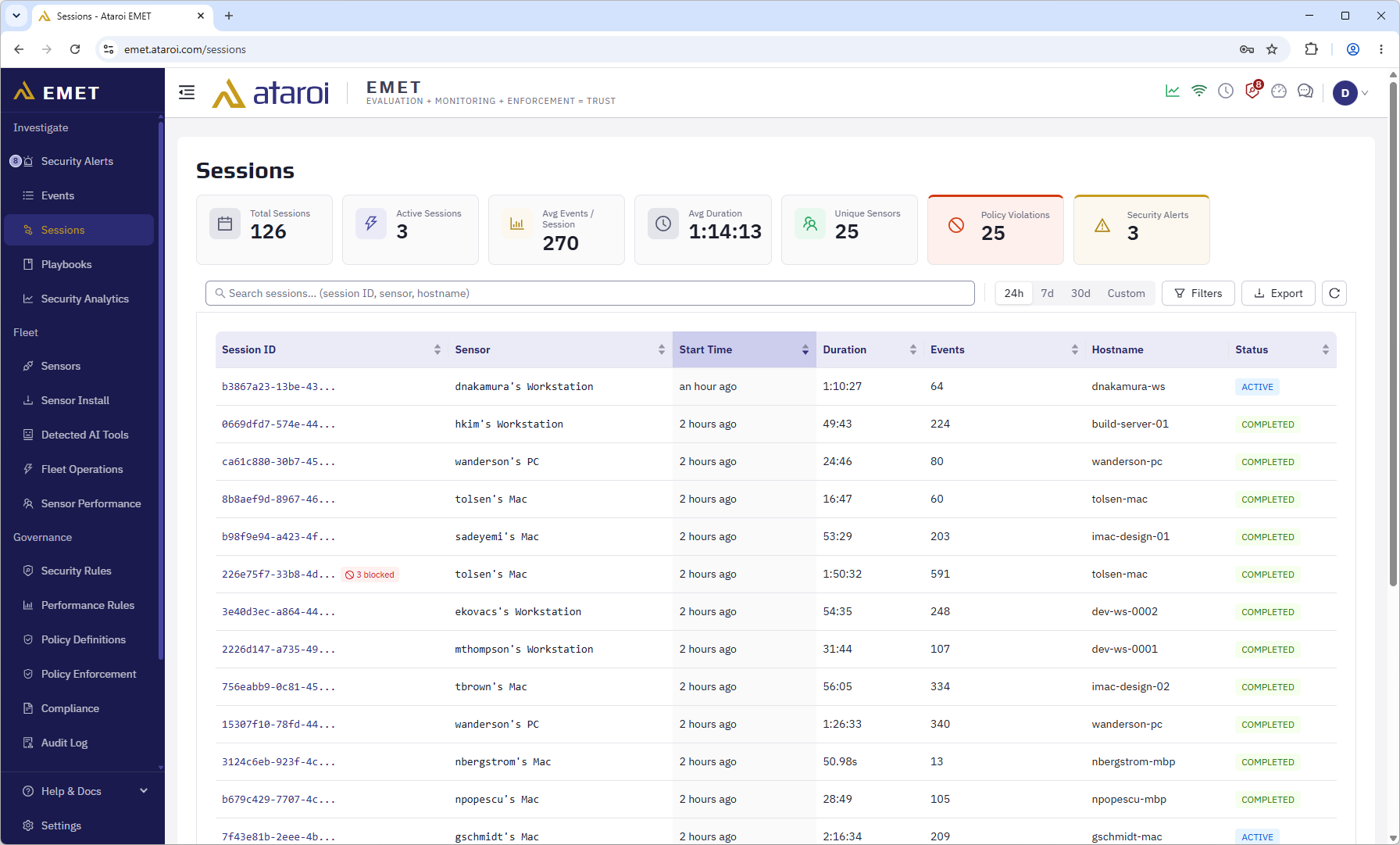
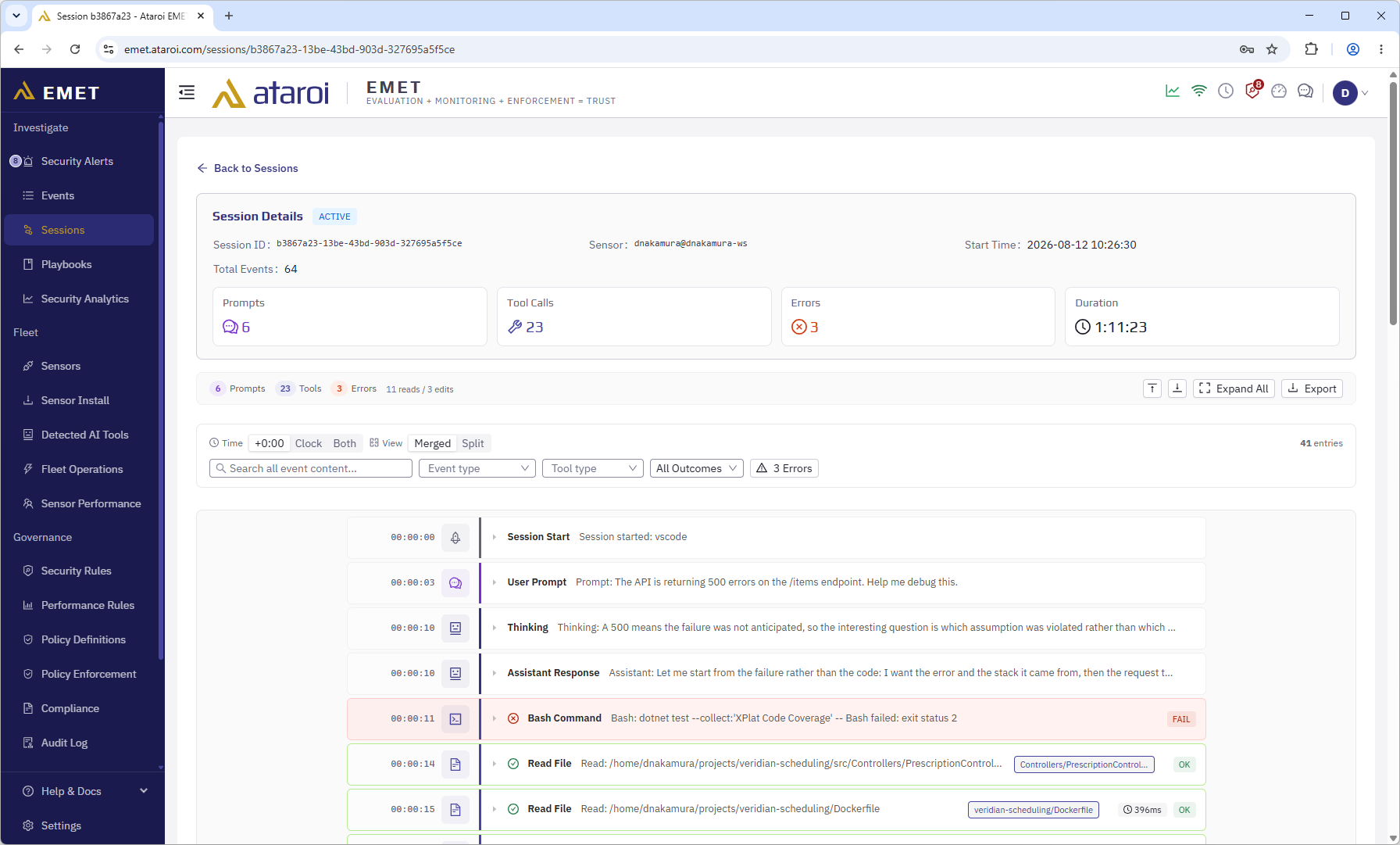
A session is an AI agent conversation — from initial prompt through all tool invocations until the agent stops. Sessions provide a natural unit of analysis: "What did the AI do during this task?"
The dashboard's Sessions page lists each session with summary metadata; clicking a session opens a chronological timeline of every captured event. Detailed dashboard reference is available in the EMET customer documentation.
Sensors
A sensor is EMET's AI agent integration component — a registered user workstation running the EMET sensor binary alongside one or more AI agents. The dashboard's Fleet > Sensors page shows all registered sensors and their health status.
The sensor is designed as a platform-agnostic integration layer. Its architecture is extensible to support additional AI agent platforms in future releases.
Detailed sensor registration, identity, and health-monitoring reference is available in the EMET customer documentation.
Tenants
A tenant is a customer organization in EMET. Multi-tenant deployments (cloud SaaS) support multiple organizations sharing the same infrastructure with complete tenant data isolation enforced at the database layer.
Self-hosted deployments typically operate as single-tenant, with all sensors belonging to one default tenant.
Each tenant has:
- A name
- A plan tier (Starter, Pro, or Enterprise) that determines available features
- Max sensors limits (per-plan)
- Settings for notifications, SIEM forwarding, and data retention
Security Rules
A security rule defines a pattern of AI behavior that warrants attention. When events match a rule's conditions, EMET fires a security alert.
EMET ships with a number of built-in security rules covering categories like:
- Credential access — Reading
.env, SSH keys, credential files - Suspicious commands — Network scanners, privilege escalation attempts
- Data exfiltration — Bulk file reads, large data transmissions
- Code injection — Suspicious eval/exec patterns
- Lateral movement — Unusual network access from the workstation
- AI agent integration tampering — Changes to the EMET AI agent integration configuration
Every rule has a severity (info, low, medium, high, critical). Pattern-matching security rules evaluate each event as it arrives. Rules can be enabled or disabled per tenant.
The full security rule catalog and configuration reference is available in the EMET customer documentation.
Security Alerts
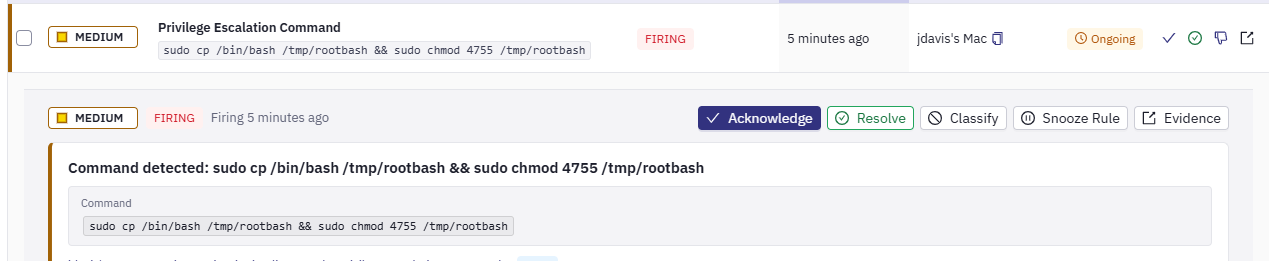
A security alert is a firing instance of a security rule. Alerts have a lifecycle:
FIRING → ACKNOWLEDGED → RESOLVED
- Firing — The rule condition is met and the alert is active
- Acknowledged — An operator has seen the alert and is investigating
- Resolved — The condition has cleared, either automatically or via manual resolution
Alerts are displayed on the Investigate > Security Alerts page and in the header status bar. New alerts also trigger the notification channels: email, Slack and Microsoft Teams.
Performance Rules
Performance rules monitor EMET's own operational health — not the behavior of AI agents, but the health of the EMET pipeline itself. Performance monitoring is available on the Pro and Enterprise tiers; the SLA status dashboard is an Enterprise-tier feature.
EMET ships with a set of built-in performance rules covering end-to-end latency, sensor processing latency, and queue backlog. Detailed performance rule reference and threshold tuning guidance is available in the EMET customer documentation.
Policies
A policy is a rule applied at the sensor that governs what AI tool invocations are allowed and how event data is treated before transmission. Unlike security rules — which fire alerts after events are stored — policies act in real time on the sensor itself — blocking risky actions, redacting sensitive data, or raising warnings. The full action reference and configuration guidance is available in the EMET customer documentation.
Policies can be scoped to specific sensors, sensor groups, or applied tenant-wide.
Data Retention
EMET stores events with per-tier retention windows. Retention for raw events is 30/90/365 days per tier (Starter/Pro/Enterprise). Hourly and daily summary rollups are retained longer.
On the Pro and Enterprise tiers, retention policies can be configured per-tenant in Settings > Organization > Retention Policies.
EMET supports GDPR Article 17 data erasure requests — a full tenant purge permanently deletes all data across all tables, with a survivor audit record for compliance purposes.
Roles
EMET supports five user roles, organized as a cumulative hierarchy where each tier inherits the permissions of the tier below it:
- Viewer — Read-only access for stakeholders who need visibility into AI activity without operational responsibility.
- Analyst — Investigates and responds to alerts, tests detection content, and authors playbooks.
- Security Manager — Authors and tunes the organization's detection and policy content, and runs compliance workflows.
- Tenant Admin — Administers users, sensors, and tenant configuration including SSO and licensing.
- Platform Admin — Cross-tenant administration for SaaS or on-premise operators.
Role-based access is enforced on every API endpoint and reflected in the dashboard UI. The full permission matrix is available in the EMET customer documentation.
Next steps:
- Learn how EMET supports SOC 2, HIPAA, and GDPR compliance — see the Compliance Overview.
- Forward AI events to your security tools with SIEM Integration.
- Compare capabilities across tiers in Plan Comparison.
Ready to get started? Sign in to your EMET dashboard → or start your free trial →.